


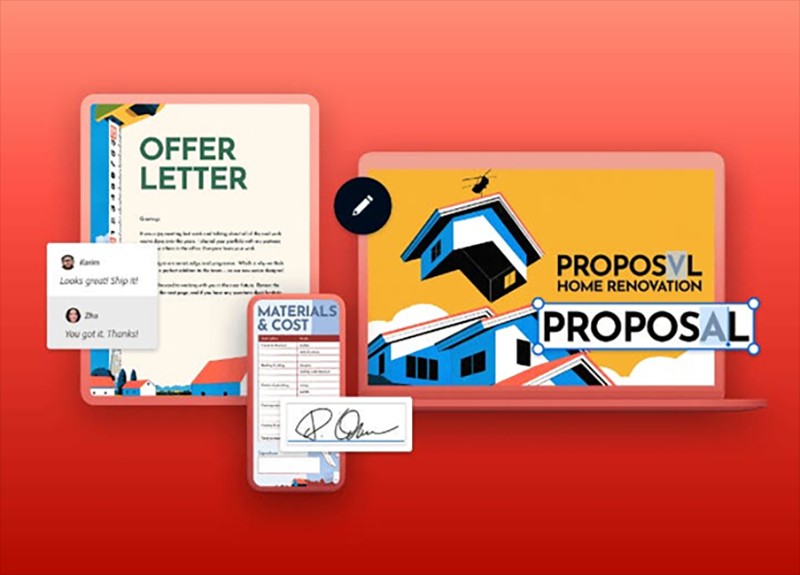
Adobe Acrobat Online Expands on Their Free To Use PDF Features
Today, the PDF file format is still the king of the digital professional landscape, and that seems unlikely to change any time soon. As more companies worldwide transition to remote or hybrid work models, even more people have come to depend on PDFs for versatile, safe, and secure online document collaboration, both when working at home and in the office. It goes without saying then that not all PDF editors are made quite the same.
Spammy online tools may call themselves “free”, but these also tend to come with a price. Deteriorated quality, limited functionality, and bloated file sizes are the least of one’s concerns when using online third-party applications and websites. When using a PDF editor with questionable origins, there is an increased risk of breached privacy and compromised safety. Truly, no document or computer is safe.
This is why the only safe way to handle your PDFs with ease of use and flexibility is with Adobe Acrobat. Acrobat makes it easier than ever to edit, share, merge, and compress PDFs on both desktop computers and mobile devices. Even better yet, Adobe has recently expanded its free-to-use PDF features available to users on any web browser – no sign-ins or sign-ups required.
Here’s a breakdown of what’s made possible when using Adobe Acrobat's online PDF editor.
High-quality online PDF tools that are secure and free to use
You can do more with your PDFs online by using trusted tools from Adobe Acrobat, the industry leader in PDF editing. Here’s how you can take control of your PDFs by using Adobe Acrobat online for free.
Edit PDF documents fast
Adobe’s free online PDF editor lets you easily edit text, add sticky notes, highlight, draw and do even more. Just upload a file and sign in to make your own annotations, then simply download or share it with others.
Trusted, free PDF editor
Acrobat’s online PDF editor keeps your documents and files safe via encryption and secured access. You can collaborate without fear of compromising on privacy by securing your documents with a password or requiring double authentication for access.
Manage your PDFs online with the best tools
Did you know that Adobe is the inventor of the PDF format? Fittingly, Adobe offers the highest quality online tools designed to maintain the overall integrity of your files. They don’t cut corners, and neither should you!
What you can do with Acrobat’s free online PDF editor
With Adobe Acrobat’s online PDF tool, you can edit and compose PDFs. Adobe has recently expanded many of the features available in their free version of Acrobat, accessible on any web browser.
Here are some of the ways you can speed up your document workflows by using Adobe Acrobat anywhere.
Give feedback with comments
Adobe Acrobat allows for better and easier collaboration with PDFs across digital spaces. Using Acrobat online, you can provide feedback directly in the PDF document for all to see. You can add sticky notes, suggest edits in-line by replacing or adding text, and even tag teammates directly to keep feedback both clear and collaborative.
Annotate PDFs
When using other PDF editors, it can be difficult to make physical changes to the file. With Adobe Acrobat, you can annotate easily within the PDF itself without fear of jeopardising its composition and structure. You can add text boxes anywhere in your PDF with customisable fonts and formatting options, allowing greater freedom to make your work documents work even more for you.
Mark up documents with drawings
PDFs are not limited to just using text. You can also incorporate artwork and vector graphics into any document, and with Adobe Acrobat, you can make your own imagery all in the same place. You can add freehand drawings, lines, or shapes in different colours and styles to your PDFs without risk of messing up your text arrangement.
Highlight important text
It’s easy to make all the most important information in your PDFs stand out when you use Adobe Acrobat’s PDF editor. Make selected text stand out by highlighting it in multiple colours. You can even attach a sticky note to your own highlights to add greater context and clarity.
Share PDFs with anyone
Sensitive and private documentation can be shared safely and securely using Adobe Acrobat, making collaboration risk-free and simple. Share a link to your PDF with anyone so they can view and collaborate on your document. This makes sharing between users on the same network convenient and confidential.
Fill and sign PDFs
Since it’s easier than ever to securely share PDFs between users, it is also easy to fill and sign your PDF documents digitally using Adobe Acrobat. Just fill out the form fields, check the boxes, and add a digital signature.
These free online features don’t just improve your workflow; they redefine what’s possible. From seamless collaboration to enhanced document clarity and professional-grade annotations, Adobe Acrobat Online helps you work the way modern teams and professionals expect.
Work Smarter and Faster for Free With Adobe Acrobat Online
As digital communication and remote collaboration continue to evolve, the need for dependable PDF tools will only grow stronger. PDFs remain the universal standard for the majority of secure and professional document handling, but the true value of a PDF document depends entirely on the tools being used to manage and share it.
With so many unreliable “free” editors floating around online, businesses and individuals all over face unnecessary risks to privacy, document integrity, and workflow efficiency. Adobe Acrobat Online eliminates those risks entirely without the need of a membership or downloading software.
By combining Adobe’s long-standing reputation as the creator of the PDF with a newly expanded suite of free-to-use online features, Acrobat gives every digital professional the power to work confidently in any setting from any device. Whether you’re editing text, marking up files with drawings, sharing sensitive documents, or signing important forms, Acrobat provides the stability, security, and precision that risky, low-quality third-party tools simply cannot match.
If you’re ready to elevate your document experience, now is the time to make the switch.
Take control of your PDFs with tools you can trust, and try Adobe Acrobat’s online PDF editor today and see just how effortless secure document management can be.
In summary:
Adobe Acrobat’s free online PDF editor gives you everything you need to make quick, professional edits directly in your browser. Once signed in with your account, you can:
- Add text boxes or sticky notes anywhere on the page.
- Highlight, underline, or strike through existing text.
- Use the drawing tool to mark up sections with arrows, shapes, or handwritten notes.
These core tools are ideal for reviewing PDFs, adding feedback, and making updates, all without downloading any software.
For more advanced editing, like modifying existing text, adjusting fonts, inserting images, or editing scanned files, you can try out Adobe Acrobat Pro free for seven days. This gives you access to powerful desktop and mobile features, including:
- Full PDF text and image editing
- OCR (optical character recognition) for editing scans
- Inserting page numbers, watermarks, and headers
- Converting PDFs into Word, Excel, or PowerPoint
- Creating fillable PDF forms and secure documents
- Signing PDFs with e-signatures
- Rearranging and organising PDF pages
- Reducing file sizes
- Securing PDFs with passwords
- Collect e-signatures from anyone that fills out web forms
- Upload existing PDF forms to instantly create web forms
- Add a logo to brand agreements
Support Our Journalism
We cannot do without you.. your contribution supports unbiased journalism
IBNS is not driven by any ism- not wokeism, not racism, not skewed secularism, not hyper right-wing or left liberal ideals, nor by any hardline religious beliefs or hyper nationalism. We want to serve you good old objective news, as they are. We do not judge or preach. We let people decide for themselves. We only try to present factual and well-sourced news.
Support objective journalism for a small contribution.