


 Google Gemini
Google brings Gemini-powered 'Polish' feature to Gmail to transform rough notes into professional emails
California/IBNS: American tech giant Google has unveiled two new updates in its ‘Help me write’ feature for Gmail, which include a new ‘Polish’ option and ‘Refine my draft’ shortcuts on Android, iOS, and web versions.
These new Gemini-powered features allow users to convert a rough email draft into a more polished or professional form and improve the user’s tonality of writing, according to Google.
This new update was announced via a new Google Workspace blog post and it improves the ‘Help me write’ feature, which is there to help you write different types of emails, reports said.
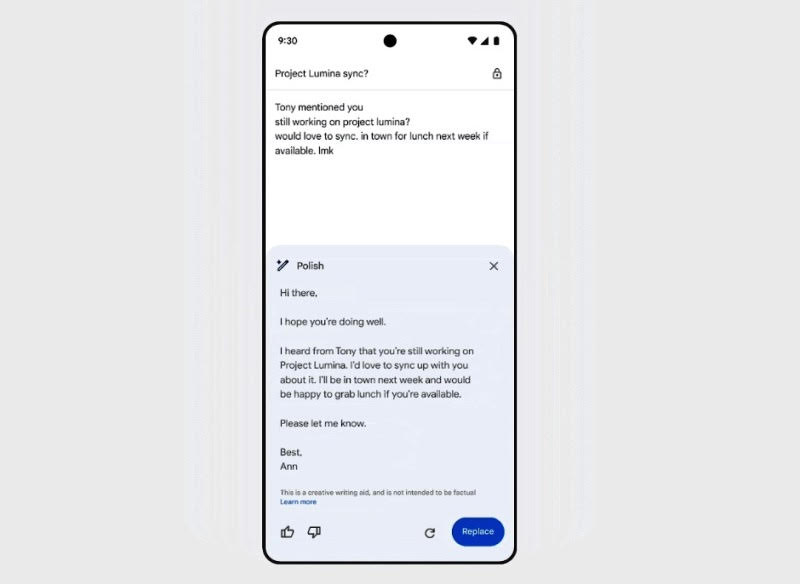 Image courtesy: Google Blog
The California-headquartered tech major said, in the blog post, that the new shortcuts for ‘Help me write’ and ‘Refine my draft’ will appear right next to the body of the email in an empty draft, and tapping on it will open the full 'Help me write' experience.
"When using Gemini to refine emails, users can choose from the following options: Formalize, Elaborate and Shorten. We recently added the Polish option to web and mobile, which can effortlessly refine your emails, saving you time," Google said in the blog post.
"For example, if you enter rough notes into a draft, Gemini can turn the content into a completely formal draft, ready for you to review in one click," the company said.
"On mobile, when an email draft is empty, the “Help me write” shortcut now appears in the body of the email and when selected, it will open the full Help me write experience," the blog post added.
When 12+ words are present in an email draft, the “Refine my draft” shortcut will be shown below the email content to indicate that there are options available to Polish, Formalize, Elaborate, or Shorten your draft, or Write a new draft. The menu can be triggered simply by swiping right on “Refine my draft”, the blog post read.
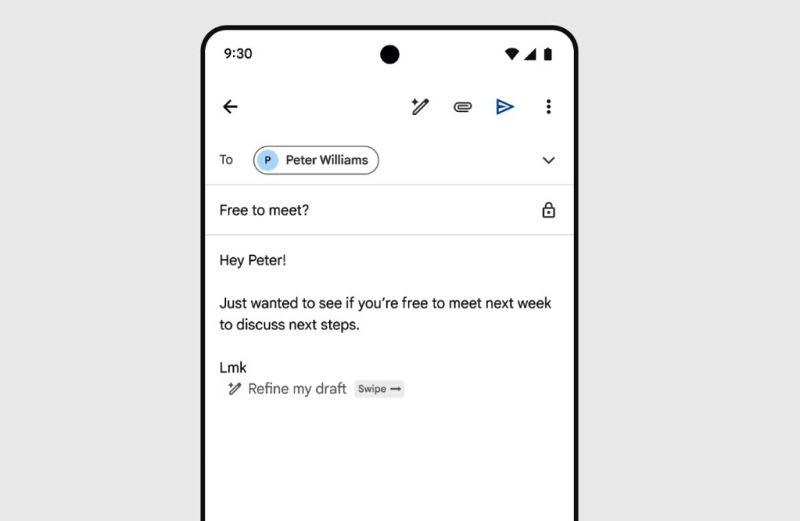 Image courtesy: Google Blog
The new Gemini Polish feature is available for Google One AI Premium users, and it is currently rolling out to Android, iOS, and web users.
Anyone who has a premium Google One account can take advantage of these new Gemini AI features, according to reports.
Support Our Journalism
We cannot do without you.. your contribution supports unbiased journalism
IBNS is not driven by any ism- not wokeism, not racism, not skewed secularism, not hyper right-wing or left liberal ideals, nor by any hardline religious beliefs or hyper nationalism. We want to serve you good old objective news, as they are. We do not judge or preach. We let people decide for themselves. We only try to present factual and well-sourced news.
Support objective journalism for a small contribution.