


 Apple
Apple
Apple unveils an all-new Lock Screen experience and new ways to share and communicate in iOS 16
California: Tech major Apple has previewed iOS 16, delivering the biggest update ever to the Lock Screen, and new sharing, communication, and intelligence features that together change the way users experience iPhone.
iOS 16 introduces iCloud Shared Photo Library to seamlessly share a collection of photos with family, updates to Messages and Mail that help users stay in touch with ease, and powerful enhancements to Live Text and Visual Look Up.
“iOS 16 is a big release with updates that will change the way you experience iPhone,” said Craig Federighi, Apple’s senior vice president of Software Engineering. “We have reimagined how the Lock Screen looks and works with exciting new features that make it more personal and helpful, introduced iCloud Shared Photo Library for families, streamlined communication through new capabilities in Messages and Mail, and harnessed enhanced intelligence with updates to Live Text and Visual Look Up.”
A Personalised Lock Screen Experience
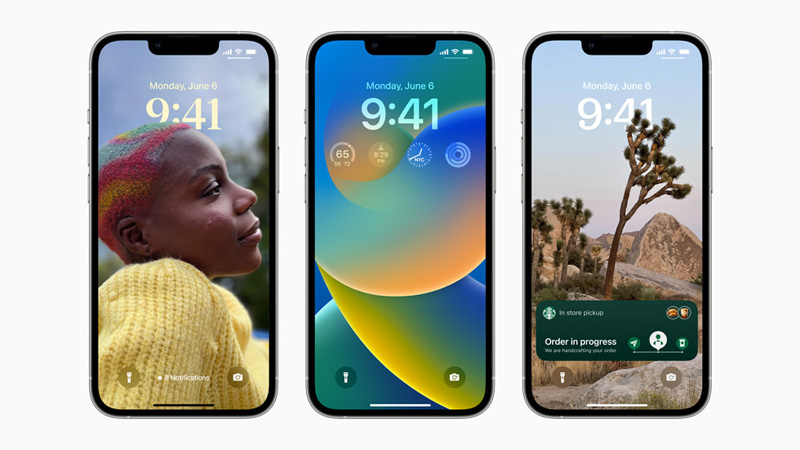
The Lock Screen gets more personal, beautiful, and helpful with iOS 16. With a new multilayered effect, the subjects of photos are artfully set in front of the time on the Lock Screen, creating a sense of depth.
Users can also change the look of the date and time with expressive type styles and color choices.
The Lock Screen features widgets that take inspiration from Apple Watch complications, making it easy to get information at a glance, such as upcoming calendar events, the weather, battery levels, alarms, time zones, Activity ring progress, and more.
A new Lock Screen gallery features a range of options for inspiration, such as Apple collections, which include Pride and Unity to celebrate special cultural moments; a Weather wallpaper to see live weather conditions as they change throughout the day; and an Astronomy wallpaper for views of the Earth, moon, and solar system.
Users can also create Lock Screens using their favorite emoji or colour combinations. With multiple Lock Screens, users can switch between their favourites with just a swipe.
Live Activities is a new feature that helps users stay on top of things that are happening in real time, such as a sports game, workout, ride-share, or food delivery order, right from the Lock Screen.
Find Balance with Focus
Focus is more powerful, easier to set up, and now connects to the Lock Screen, offering users a way to tie a Lock Screen wallpaper and widgets to a particular Focus.
To activate a Focus, users can simply swipe to the corresponding Lock Screen. With Focus filters, apps like Calendar, Mail, Messages, and Safari can display only the content that is relevant to a user’s Focus, helping them to find better balance.
A personalised Lock Screen in iOS 16 shows a Link Focus menu.
A personalised Lock Screen in iOS 16 shows a user is using their Personal Focus setting.
A personalised Lock Screen in iOS 16 shows a user is using their Work Focus setting.
A user’s Messages inbox shows that the user is filtering by Focus.
A user’s Mail inbox shows that the user is filtering by Focus.
Support Our Journalism
We cannot do without you.. your contribution supports unbiased journalism
IBNS is not driven by any ism- not wokeism, not racism, not skewed secularism, not hyper right-wing or left liberal ideals, nor by any hardline religious beliefs or hyper nationalism. We want to serve you good old objective news, as they are. We do not judge or preach. We let people decide for themselves. We only try to present factual and well-sourced news.
Support objective journalism for a small contribution.