


 BHIM
BHIM
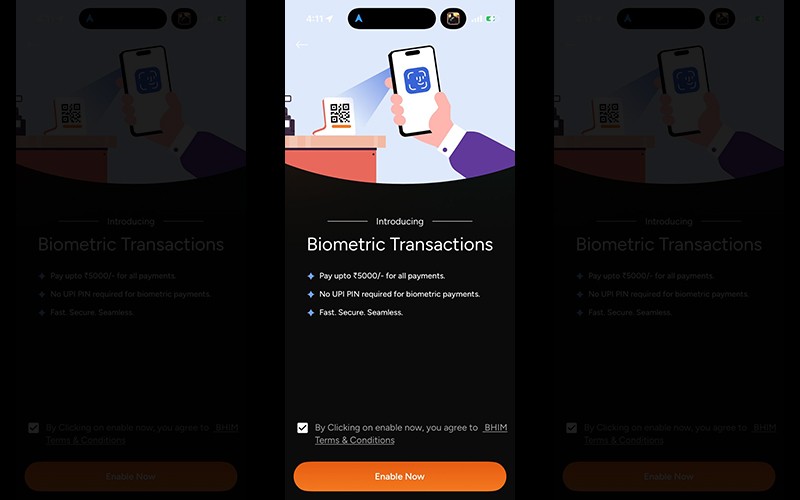
BHIM payments app introduces biometric authentication for UPI payments on Android, iOS
NPCI BHIM Services Limited (NBSL), a wholly owned subsidiary of the National Payments Corporation of India (NPCI), on Tuesday announced the launch of Biometric Authentication for UPI Payments on the BHIM Payments App.
The new feature allows users to approve UPI transactions up to ₹5,000 using their smartphone’s fingerprint or facial recognition, making everyday payments quicker, simpler, and more secure.
The feature is currently available for iOS and Android devices, which supports fingerprint and facial recognition capabilities.
With this launch, BHIM users can transact without manually entering their UPI PIN for every payment. This is especially helpful in situations where users may forget their PIN or enter it incorrectly, which can lead to failed payments, making the experience smoother and more reliable. The feature can be used across common payment scenarios, including sending money to friends and family, merchant QR payments, and online transactions, making digital payments more intuitive for everyday use.
Lalitha Nataraj, MD & CEO, NBSL, said, “BHIM Payments App has always focused on making digital payments simple, secure and accessible for every Indian. With biometric authentication, we are making everyday payments easier while strengthening trust in how they are approved. By enabling users to confirm transactions through their fingerprint or face unlock, we are reducing reliance on PIN entry while keeping payments closely tied to the user. This is another step towards building a seamless and dependable digital payments experience for millions of Indians.”
Biometric authentication adds an additional layer of security to the payment experience. Since fingerprints and facial recognition are unique to each user and stored on the device, payments remain closely linked to the user’s identity. This reduces risks such as PIN sharing or incorrect entry, allowing users to transact with greater confidence. Transactions above ₹5,000 will continue to require UPI PIN authentication, ensuring an added layer of protection for higher-value payments.
How to Enable Biometric Authentication on BHIM Payments App:
1. Open the BHIM Payments App
2. Go to Profile
3. Select your bank account
4. Activate Biometric Transactions
5. Now make payments of upto ₹5000 with your fingerprint
Support Our Journalism
We cannot do without you.. your contribution supports unbiased journalism
IBNS is not driven by any ism- not wokeism, not racism, not skewed secularism, not hyper right-wing or left liberal ideals, nor by any hardline religious beliefs or hyper nationalism. We want to serve you good old objective news, as they are. We do not judge or preach. We let people decide for themselves. We only try to present factual and well-sourced news.
Support objective journalism for a small contribution.